


Troubleshooting Internet Banking
Resetting your password
If you’ve forgotten your password or locked out of Internet Banking, follow our guide to reset your password quickly and easily.
To reset your password, you will be required to have SMS Security registered on your account. Find out how to Register for SMS Security.
Go to our Internet Banking login page > click Forgot your password?
Enter your member number and date of birth.
Select Next > then click to get an SMS One Time Password.
Enter your SMS One Time Password and your new Internet Banking password.
Login to Internet Banking.
If you do not receive you SMS One Time Password please contact us.
We can issue you a new temporary password.
Head to our Internet Banking page and click ‘Register’ and fill the form out again and we will issue you a new temporary password.
Please contact us.
Your temporary password is active for a short period of time.
If you are a newly registered Internet Banking customer, please register again and we can issue you a new password.
Head to our Internet Banking page and click ‘Register’ and fill the form out again and we will issue you a new temporary password.
If you are an existing Internet Banking customer and can’t log in using your temporary password, please contact us so we can issue you a new one.
We will need to unlock your Internet Banking, please contact us.
Caching issues
When you use a browser, it saves some information from websites in its cache and cookies. Clearing them fixes certain problems, like loading or formatting issues on sites.
Try to refresh the cache on your computer is by pressing the CTRL and F5 keys together. If this does not work, you can clear your computer browser’s cache by following the instructions for each type of browser below. Please note that this may remove any stored log in or password details you have stored on websites.
Clearing your browser cache on your mobile device
1. Open the Settings app on your device, then select Safari.
2. Scroll down, then select Clear History and Website Data.
3. Tap Clear History to confirm.
Before clearing cache and cookies
When you clear your cache and cookies, your browser might sign you out of your Google Account. To make sure you can sign back in, update your recovery phone number and email address.
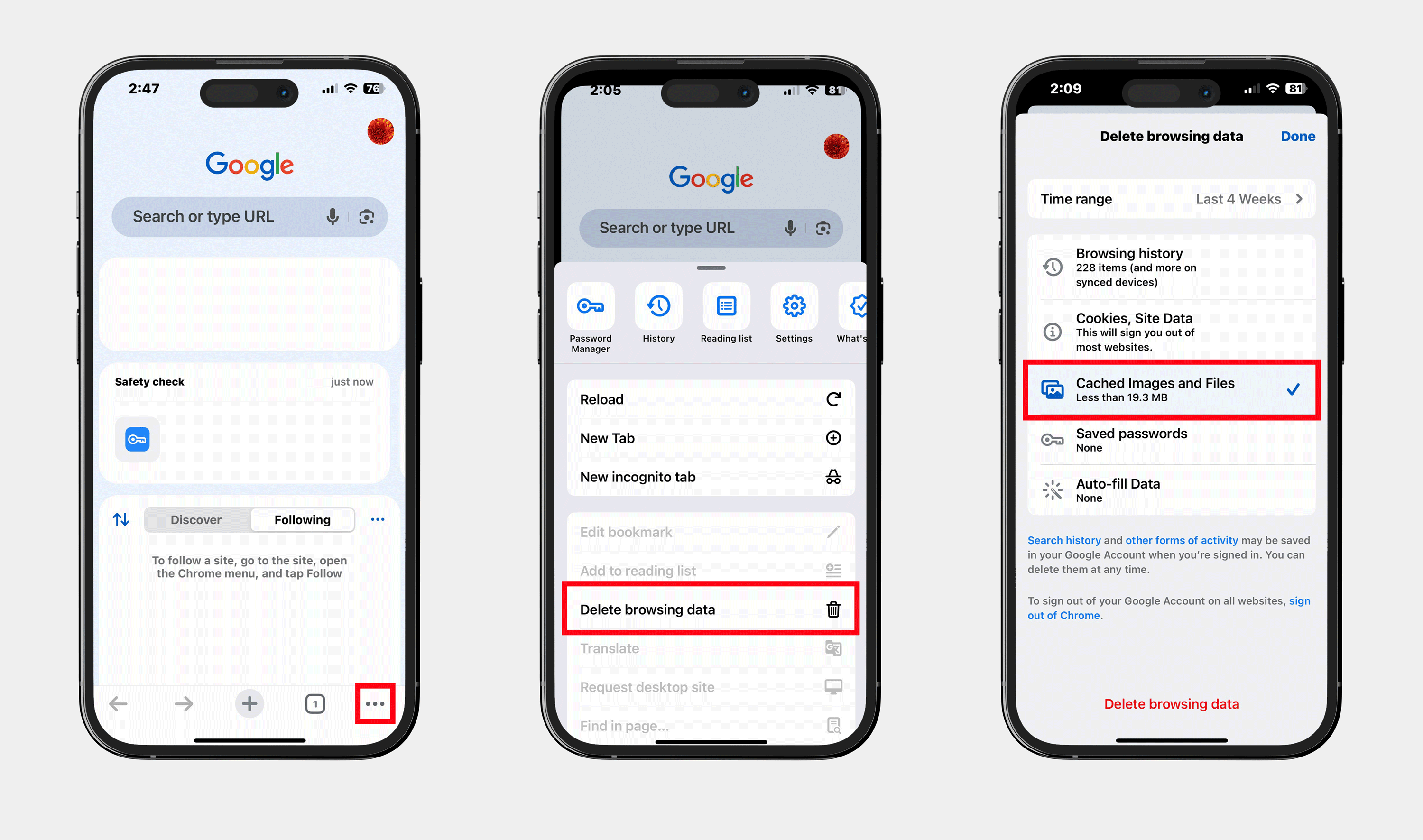
1. Open the Google Chrome app on your device.
2. Select the three dots menu at the bottom right corner of the screen.
3. Scroll down and select Delete browsing data.
4. Tap Time range and select All time.
5. Select the check mark Cached Images and Files.
6. Scroll down and select Delete browsing data.
1. Open the Chrome app on your Android device.
2. Tap More at the top right then select Delete browsing data.
3. To delete browsing history (including open tabs), choose a duration and tap Delete data and select All time.
4. Ensure Cached Images and Files are checked.
5. Tap Delete data to confirm.
Clearing your browser cache on your computer
1. On your computer, open Google Chrome.
2. Press the Shift-Ctrl-Del keys simultaneously. The following is displayed:
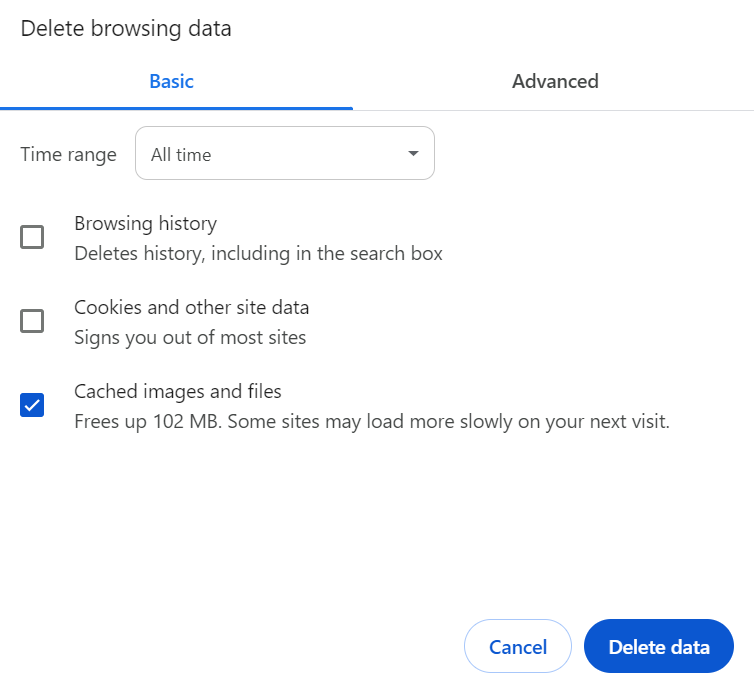
3. Select the time range All time.
4. Only tick the Cached images and files box and then click on the Delete data button.
1. On your computer, open Microsoft Edge.
2. Press the Shift-Ctrl-Del keys simultaneously. The following is displayed:
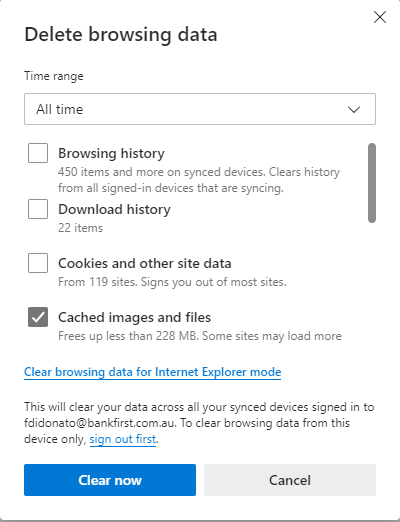
3. Select the time range All time
4. Only tick the Cached images and files box and then click on the Clear now button
1. On your computer, open Firefox.
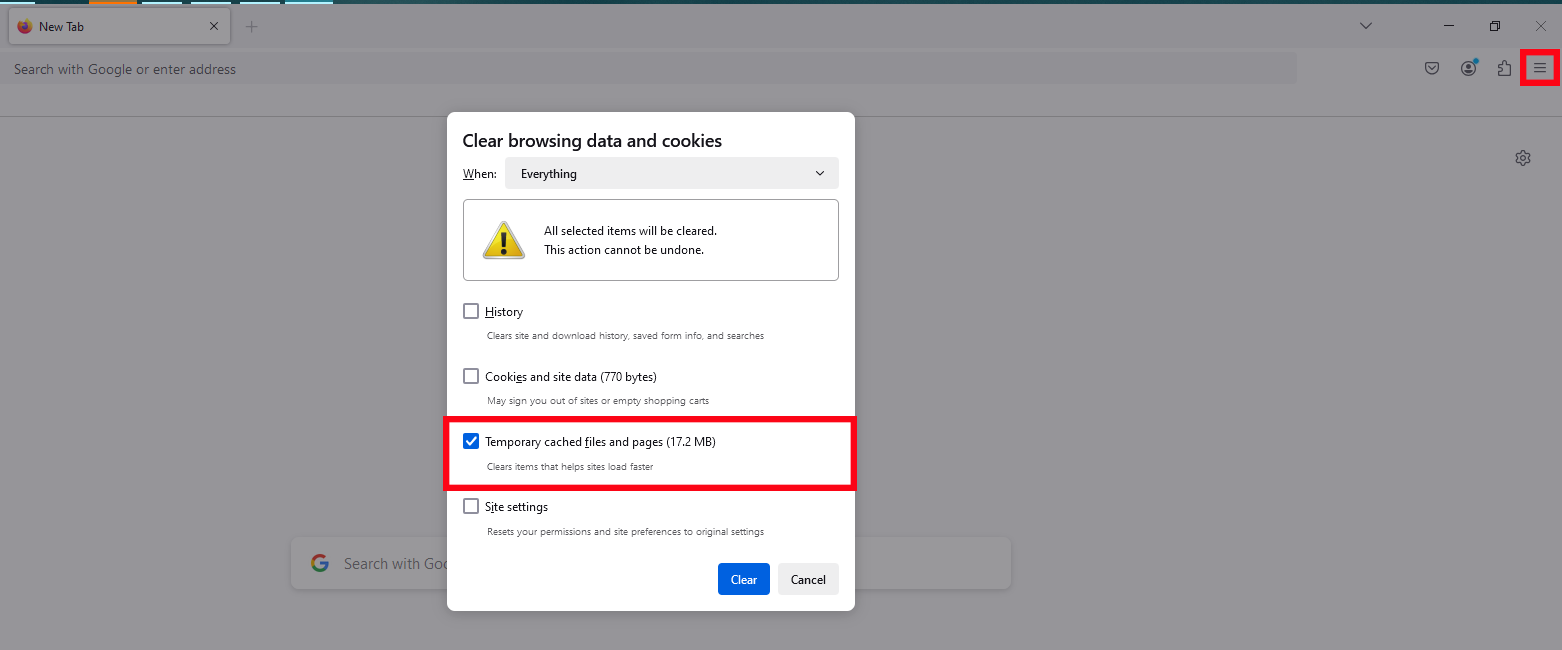
2. Click the menu button and select History.
3. Select Clear recent history.
4. In the When drop down field, select Everything.
5. Remove the check mark in front of History, Cookies and Site Data and Site settings...
6. Select the check mark Temporary cached files and pages..
7. Select Clear.
Click on the Safari menu in the top left hand corner next to the Apple symbol.
Click on Settings... and a new dialogue box will open.
Click Privacy.
Click on the Manage Website Data button.
To remove any cached data and cookies from your computer, click Remove all and a new dialogue box will open.
Click Remove Now.
Wait a few moments, then click Done.
Close the dialogue box remaining.
Press Command +Q to quit Safari.
Cookie issues
You can choose to change your browser’s cookie settings via your browser privacy settings, including blocking the use of cookies. However, if you choose to delete or block cookies, your experience on our Internet Banking may limited.
On your computer, open Chrome
Click the 3 dots in the top right hand corner of the screen and select Settings
Select Privacy and Security
Select Site Settings
Select Cookies and site data
Allow sites to save and read cookie data (recommended)
On your computer, open Safari
Click on the Safari drop-own menu and select Preferences
Select Preferences
Select Privacy
Select Accept Cookies
Click on Enable
On your computer, open Firefox
From the toolbar click on Tools
Click on Options
Select Privacy tab
Click on Cookies
Click on Allow site to set cookies
Open Internet Explorer 11 or Edge
Click the Settings icon (top right corner) and click Internet Options
Click on the Privacy tab
Select Advanced
Select Accept Cookies
Click on OK


